DeepSeek Review 2026: What Is DeepSeek, Is It Free & Is It Safe?

In this guide
A few months ago, I found myself looking for an AI tool that could do more than generate generic answers. I wanted something that could help me understand complicated technical topics, debug code, analyze information, and save time without forcing me into an expensive subscription.
That’s when I started exploring DeepSeek.
What caught my attention wasn’t just the excitement surrounding AI models. It was the growing ecosystem around DeepSeek, including its reasoning capabilities, developer API, and open-source projects.
But there’s more to the story than simply asking an AI chatbot questions.
Is DeepSeek actually free? Can developers use its API without paying? Is it safe to upload personal information? And what exactly is DeepSeek Harness on GitHub?
Let’s break everything down in plain English.
What Is DeepSeek?
DeepSeek is an artificial intelligence company that develops large language models (LLMs) designed to understand natural language, solve problems, generate code, and perform complex reasoning tasks.
Think of it as an AI assistant that can help with everyday questions as well as advanced technical work.
Unlike traditional search engines, which primarily return links to websites, DeepSeek generates responses based on your instructions and the context you provide.
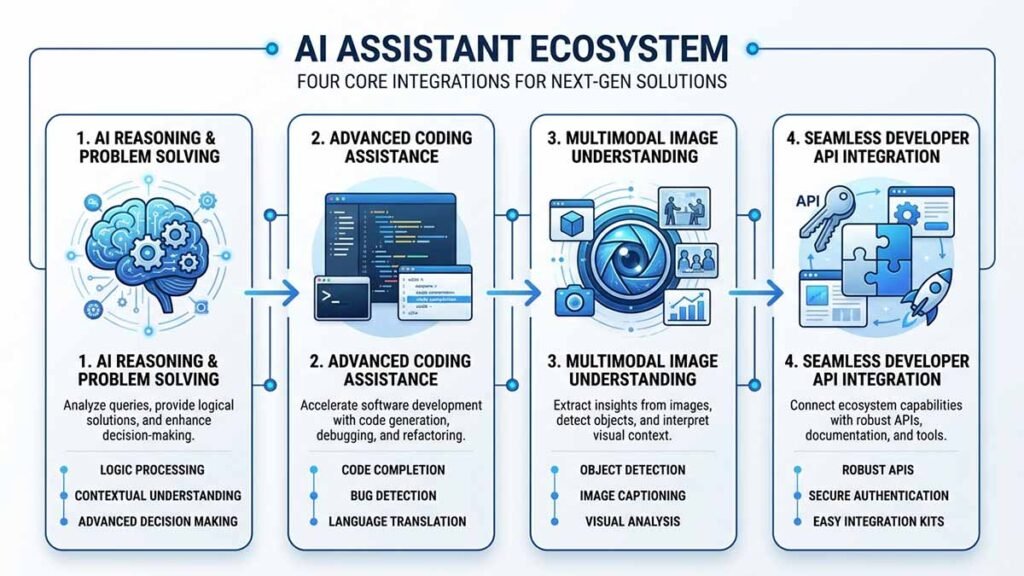
Some of its important capabilities include:
- AI conversations: Ask questions and receive detailed responses.
- Reasoning: Work through complicated problems using supported thinking modes.
- Coding assistance: Generate code, explain programming concepts, and troubleshoot errors.
- Content creation: Draft articles, emails, summaries, and documentation.
- Data analysis: Help interpret information and organize complex material.
- Developer integration: Connect AI capabilities to applications through its API.
DeepSeek’s newer V4.1-Flash model also supports multimodal capabilities, including vision, making the ecosystem more interesting for developers.
The important distinction is that DeepSeek isn’t just one chatbot. It’s an expanding collection of AI models, developer tools, and applications.
Personal Experience with DeepSeek
I prefer evaluating AI platforms through practical tasks rather than believing every benchmark or marketing claim.
One test scenario I use when evaluating a coding assistant is straightforward: give it a small Python script containing an error and ask it to identify the problem, explain the cause, and suggest a corrected version.
For a proper DeepSeek evaluation, I’d compare three things:
- Whether it identifies the actual programming error.
- Whether its explanation makes sense to someone learning Python.
- Whether the suggested correction works when executed.
I’d also test it with a longer technical document to see how well it maintains context and extracts important information.
Here’s my honest observation about evaluating DeepSeek: a convincing explanation doesn’t automatically mean correct output. I would always run generated code, verify technical claims, and compare important answers against reliable sources.
I don’t want to pretend I’ve personally completed a particular benchmark or run a live experiment that I haven’t independently verified. These are reproducible tests I’d recommend before trusting any AI assistant with important work.
My biggest takeaway is simple: judge an AI tool by whether it consistently solves your actual problems, not by how impressive its first response looks.
Key Features of DeepSeek
Let’s look at the capabilities that make DeepSeek worth exploring.
1. Advanced Reasoning
Reasoning is particularly useful when a question requires multiple steps rather than a straightforward answer.
For example, you can ask DeepSeek to:
- Explain a complicated algorithm.
- Break down a mathematical problem.
- Analyze a programming error.
- Compare different technical approaches.
- Develop a structured solution to a problem.
Its supported thinking mode allows users to request more deliberate reasoning for challenging tasks.
2. AI Coding Assistance
For developers, coding assistance is one of the most practical applications.
You can use DeepSeek to:
- Generate Python, JavaScript, and other code.
- Explain unfamiliar codebases.
- Find potential bugs.
- Write SQL queries.
- Create documentation.
- Suggest improvements to existing code.
However, don’t blindly copy generated code into production. Test it, inspect dependencies, and check security implications.
3. Multimodal Capabilities
DeepSeek’s V4.1-Flash model supports vision alongside text-based capabilities.
This expands potential use cases to include interpreting visual information, working with screenshots, and analyzing supported image inputs.
Actual availability depends on the model and interface you’re using.
4. Developer-Friendly API
DeepSeek provides an API compatible with commonly used OpenAI and Anthropic API formats.
This makes integration easier for developers who already understand these interfaces.
You can build chatbots, automation workflows, AI-powered applications, and other software without designing an entire language model from scratch.
Is DeepSeek Free?
Yes, DeepSeek offers free access to its chatbot, but its API is a separate paid service.
This distinction matters because many people confuse free chatbot access with free developer API access.
Here’s the practical breakdown:
- Web chatbot: Available without a standard monthly subscription fee.
- Mobile application: Offers access to DeepSeek’s chatbot.
- Developer API: Uses pay-as-you-go token billing.
- Self-hosting: Depends on the model’s availability, licensing, and your infrastructure costs.
If you’re simply experimenting with AI, the chatbot is a sensible starting point.
If you’re building software that sends automated requests to DeepSeek, you should calculate API expenses before launching.
Is DeepSeek API Free?
No, you shouldn’t assume that DeepSeek API usage is permanently free.
DeepSeek uses token-based billing. You pay according to the input and output tokens processed by your requests.
As of November 2026, its official pricing documentation lists the following rates:
| Model | Input (cache miss) | Output |
|---|---|---|
| DeepSeek V4.1-Flash | $0.15 / 1M tokens | $0.60 / 1M tokens |
| DeepSeek V4-Pro | $0.66 / 1M tokens | $1.98 / 1M tokens |
These are off-peak rates. Peak rates are twice as high. Cached input also has a separate, lower price.
The official pricing schedule defines peak hours as 01:00–04:00 and 06:00–10:00 UTC, Monday through Friday, excluding Chinese public holidays.
For developers in Bangladesh, that’s worth remembering because Bangladesh operates on UTC+6.
Before integrating the API, check the latest rates at https://api-docs.deepseek.com/quick_start/pricing/.
How to Get Started with DeepSeek API
Getting started is relatively straightforward:
- Visit https://platform.deepseek.com/.
- Create an account.
- Generate an API key.
- Add the key to your application’s environment variables.
- Configure the API endpoint and model.
- Send your first request and monitor usage.
For example, a basic Python integration using the OpenAI-compatible SDK looks like this:
from openai import OpenAI

client = OpenAI(
    api_key="YOUR_DEEPSEEK_API_KEY",
    base_url="https://api.deepseek.com"
)

response = client.chat.completions.create(
    model="deepseek-flash",
    messages=[
        {"role": "user", "content": "Explain Python decorators"}
    ]
)

print(response.choices[0].message.content)
Install the SDK with:
pip install openaiFor a real application, store your API key in an environment variable rather than writing it directly into your source code.
Is DeepSeek Safe?
This is probably one of the most important questions to consider before using DeepSeek.
My answer is that safety depends on what you’re sharing, which DeepSeek service you’re using, and how you configure your workflow.
DeepSeek’s privacy policy, updated February 10, 2026, explains that the company collects information such as account details, user inputs, uploaded files, and technical information.
It also states that personal data may be processed and stored in China.
That doesn’t automatically mean your information will be misused. However, it is an important consideration for anyone handling confidential information.
My Recommended Safety Practices
I recommend following these precautions:
- Never paste passwords, API keys, or private authentication tokens into prompts.
- Avoid uploading confidential business documents.
- Remove personally identifiable information before sharing datasets.
- Review the privacy policy before using the platform professionally.
- Verify AI-generated code before deploying it.
- Use separate development environments for experimental projects.
If you’re working with sensitive customer information, financial records, or internal company documents, consider your organization’s data protection requirements before choosing any cloud AI provider.
My verdict: DeepSeek can be useful for general productivity and development, but I wouldn’t automatically trust any cloud AI service with confidential information.
What Is DeepSeek Harness on GitHub?
Here’s something developers should pay attention to.
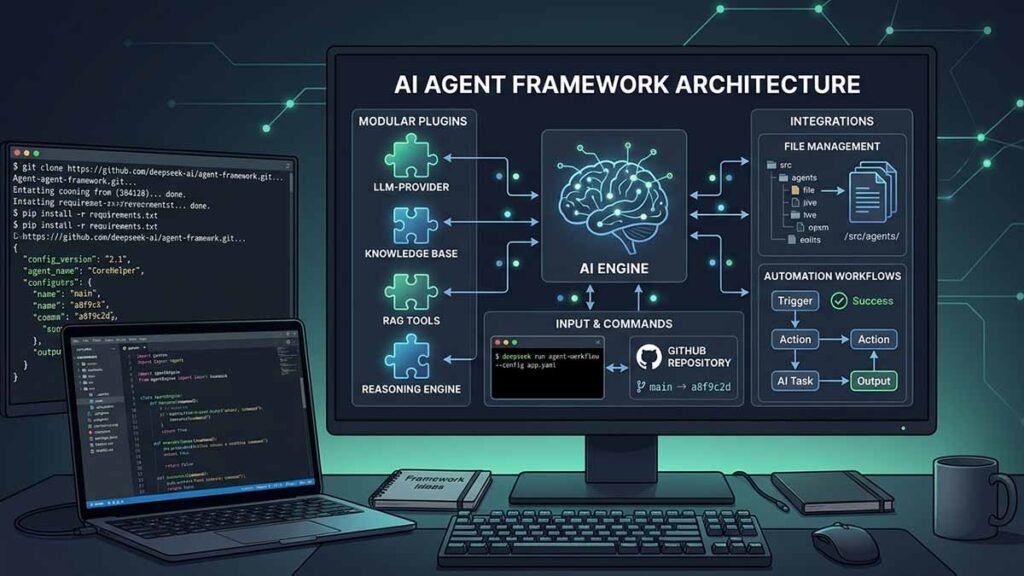
DeepSeek Harness is an open-source AI agent framework developed by DeepSeek AI.
GitHub repository:
https://github.com/deepseek-ai/deepseek-harness
Unlike a conventional chatbot, an agent harness provides an environment where an AI system can interact with tools, execute tasks, and work through more complex workflows.
DeepSeek Harness follows an architecture described as “Everything is a Plugin” and is powered by Cordis.
Some of its intended applications include:
- Working with files and documents.
- Exploring software repositories.
- Fixing bugs and running tests.
- Performing research.
- Automating background tasks.
- Extending functionality through plugins.
How to Install DeepSeek Harness
According to its GitHub repository, you can launch the web interface using npm:
npx @deepseek-ai/dsh webYou’ll need Node.js installed first.
Alternatively, you can clone the repository:
git clone https://github.com/deepseek-ai/deepseek-harness.git

cd deepseek-harness

pnpm install

pnpm run build

pnpm dsh web
The local web interface runs at:
http://127.0.0.1:3080Is DeepSeek Harness Safe to Run?
Here’s where I’d be particularly careful.
The project’s official safety documentation explicitly describes it as experimental developer-preview software that hasn’t undergone a security audit.
It can execute model-generated commands, load third-party plugins, and access files, processes, credentials, and network resources made available to it.
That creates real security risks.
My recommendations:
- Run it inside a disposable virtual machine or isolated environment.
- Avoid exposing personal credentials.
- Review plugins before installing them.
- Back up files before granting access.
- Inspect commands before approving execution.
Don’t treat sandboxing or approval prompts as a guarantee of complete security.
DeepSeek vs ChatGPT: Which One Should You Choose?
Both platforms offer useful AI capabilities, but the better choice depends on your workflow.
| Comparison | DeepSeek | ChatGPT |
|---|---|---|
| General AI chat | Yes | Yes |
| Coding assistance | Yes | Yes |
| Reasoning capabilities | Yes | Yes |
| Developer API | Yes | Yes |
| Multimodal support | Model-dependent | Model-dependent |
| Open-source projects | Yes | Some open-weight offerings |
| Pricing | Free chat; paid API | Plan and API dependent |
| Agent development | DeepSeek Harness | Available tools and integrations |
I wouldn’t declare one platform the universal winner.
Choose based on output quality, reliability, privacy requirements, integration options, and total operating cost.
Frequently Asked Questions
What is DeepSeek mainly used for?
DeepSeek is used for AI conversations, reasoning, coding assistance, content generation, problem-solving, and developer integrations through its API.
Is DeepSeek completely free?
Its chatbot offers free access, but API requests are billed separately based on token consumption. Additional services may have separate charges.
Is DeepSeek safe to use?
It can be useful for everyday tasks, but users should understand its privacy policy and data storage practices. Avoid sharing sensitive information without appropriate approval.
Is DeepSeek API free for developers?
No permanent free API tier should be assumed. DeepSeek uses token-based pricing, although promotional credits may be available occasionally.
What is DeepSeek Harness GitHub?
DeepSeek Harness is an open-source agent framework that allows developers to build workflows using plugins, tools, and AI-powered automation. It is available at https://github.com/deepseek-ai/deepseek-harness.
Conclusion: Is DeepSeek Worth Trying in 2026?
After looking at its chatbot, developer API, reasoning capabilities, and agent ecosystem, I think DeepSeek deserves attention from anyone interested in practical AI tools.
For beginners, its free chatbot provides an accessible starting point.
For developers, the API offers an interesting way to integrate AI into applications with token-based pricing.
And for people exploring autonomous workflows, DeepSeek Harness opens another interesting direction through its plugin-based architecture.
However, don’t ignore privacy and security. Particularly when experimenting with AI agents, always control which files, credentials, and system resources they can access.
Rohit’s Final Tip
My advice is simple: don’t choose an AI platform just because everyone is talking about it.
Start with one real problem. Test DeepSeek against that problem, verify the results, calculate the cost, and decide whether it genuinely improves your workflow.
That’s how I believe you should evaluate any technology.
Have you tried DeepSeek yet? Share your experience in the comments, and let me know whether you’re using it for everyday AI tasks, software development, or automation.