How to Clean, Sort and Deduplicate a Text List
Choose an order of operations that preserves the entries you need and makes matching rules clear.
In this guide
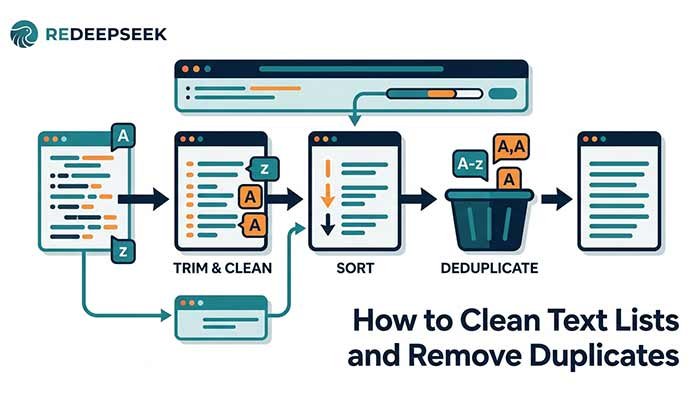
A copied list can contain extra spaces, repeated lines and inconsistent order. Cleaning it is easier when you treat those as separate operations. Keep an original copy and decide whether formatting differences represent distinct values before changing them.
Inspect a tiny sample first
Suppose the list contains Delhi, Mumbai, Delhi and delhi on separate lines. Exact duplicate removal keeps Delhi, Mumbai and delhi because letter case is significant. Ignore-case mode treats the two spellings of Delhi as the same comparison value and keeps the first original line.
Now imagine a line containing “Delhi ” with a trailing space. It is not an exact match for “Delhi”. Decide whether that space is an error or intentional. Do not assume every visually similar line is identical.
Clean spaces when appropriate
The Extra Space Remover trims each line, reduces repeated spaces and tabs, and limits long runs of blank lines. Use it for ordinary prose-like entries. Avoid it for code, aligned tables or text where spaces carry meaning.
If you clean before deduplicating, lines that differed only by extra spaces may become equal. That may be exactly what you want, but it changes the matching decision. Compare a few representative lines before applying the same operation to the whole list.
Remove duplicates with the right rule
Choose exact matching when case distinguishes entries. Choose ignore-case when “Delhi” and “delhi” should be treated as the same item. The remover keeps the first occurrence and preserves the order of retained lines.
It does not detect similar meanings, repeated people or equivalent addresses. Two different spellings of the same organization remain separate. If semantic matching matters, review the items manually rather than relying on text equality.
Sort only after deciding what to keep
The Line Sorter uses English locale comparison with numeric ordering. “Task 2” appears before “Task 10” in ascending order. Each whole line is one item; it does not understand spreadsheet columns. Duplicates remain unless you removed them in a separate step.
Sorting first changes which occurrence a later deduplication step encounters. If original order matters, deduplicate before sorting or keep the original alongside the result. Do not discard provenance you may need later.
Review the final list
Compare the number of retained entries and inspect the first, last and a few middle items. Check for missing punctuation, blank lines and unintended case changes. Copy the reviewed result into your own document. These tools process text locally and do not save a history you can restore after reloading.
Questions that often come up
Will duplicate removal trim spaces automatically?
No. Spaces are part of the matching value. Use the separate space cleaner first only if that normalization fits your task.
Does sorting remove duplicates?
No. Sorting changes order; deduplication removes repeated matching lines. Keep the operations and their effects separate.
Try the related pages
This guide was prepared with AI assistance and checked against the behaviour of the ReDeepSeek tools. Review AI answers before using them and report unclear examples through our Contact page.